🔮 Future-Proofing C++ Interfaces for Blueprint
Unreal Engine’s UInterface is powerful, but adding Blueprint support often leads to fragile call patterns scattered throughout your codebase. This post shows a simple wrapper pattern that keeps your interface calls clean and provides a painless migration path when you need Blueprint compatibility in the future.
# Table of Contents
# UInterface
Interfaces are a powerful abstraction mechanism. They are ideal for modeling imperative communication between different systems while avoiding the rigidity of inheritance. Most programming languages provide some way to write interfaces, and so does C++ with pure virtual functions. But for full compatibility, Unreal Engine has a built-in UInterface class, which brings a few awkward things with it when it comes to Blueprint compatibility. Here is how I smooth out interfaces for both C++ and Blueprint. But first, here is a short recap on how to use UInterface.
# Quick Recap
Say we wanted to have various pieces of equipment like items, weapons, and armor in our game that can be equipped to a character. A data asset UEquipmentAsset defines how a piece of equipment gets equipped, what it looks like, and which socket it gets attached to. But how do we add this data asset to our various in-game items without a rigid inheritance hierarchy?
By using an interface IEquippable that provides us with a UEquipmentAsset we can make any class equippable, regardless of whether it is an item, weapon, or armor.
We declare a UInterface by using the UINTERFACE macro and 2 separate class declarations.
UINTERFACE(BlueprintType)
class UEquippable : public UInterface
{
    GENERATED_BODY()
};

class IEquippable
{
    GENERATED_BODY()

public:
    UFUNCTION(BlueprintCallable)
    const UEquipmentAsset* GetEquipmentAsset() const;
};
To use the interface, we only need to inherit from IEquippable and implement the function in any of our classes.
UCLASS()
class AEquippableActor : public AActor, public IEquippable
{
    GENERATED_BODY()

public:
    // Concrete implementation omitted for brevity.
    virtual const UEquipmentAsset* GetEquipmentAsset() const override;
};
Then we can cast any object to IEquippable and get the required asset by calling GetEquipmentAsset in both C++ and Blueprint.
if (const IEquippable* Equippable = Cast<IEquippable>(SomeObject))
{
    if (const UEquipmentAsset* EquipmentAsset = Equippable->GetEquipmentAsset())
    {
        // SomeObject is equippable, execute equipment logic...
    }
}
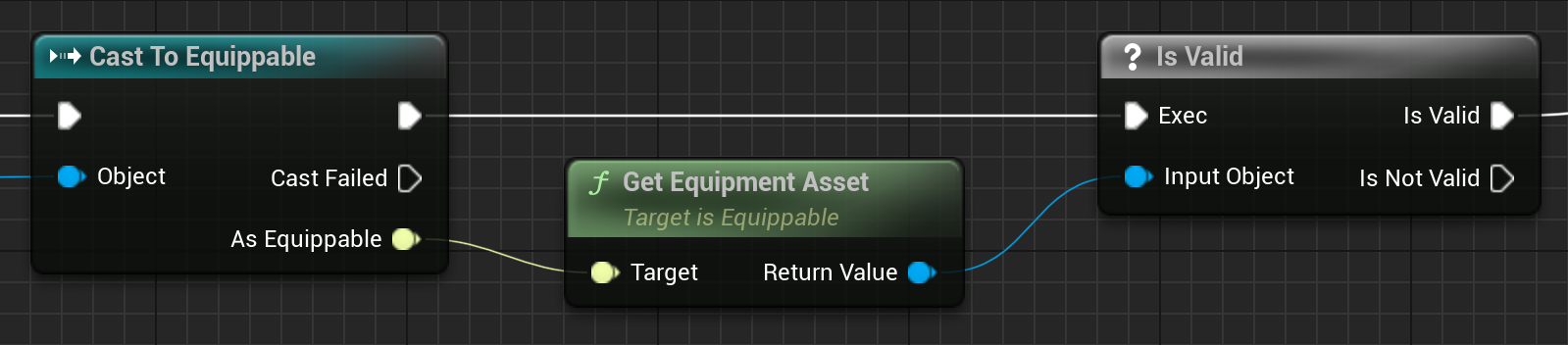
There is actually a much cleaner way to call interface functions in Blueprint using Message Nodes.
At no point do we get an error here. We are safely checking that SomeObject is indeed equippable before getting the asset. This is an important detail when it comes to…
# Adding Blueprint Support
Let us take stock: We have an interface that can be implemented in C++ and called in both C++ and Blueprint. But what if we want to implement the interface in Blueprint? To make a UInterface implementable in Blueprint, we have to mark the UINTERFACE as BlueprintType (which we already have) and then mark the UFUNCTION as BlueprintNativeEvent.
UINTERFACE(BlueprintType)
class UEquippable : public UInterface
{
    GENERATED_BODY()
};

class IEquippable
{
    GENERATED_BODY()

public:
    UFUNCTION(BlueprintNativeEvent, BlueprintCallable)
    const UEquipmentAsset* GetEquipmentAsset() const;
};
An implementing C++ class must now be adjusted in the following way.
UCLASS()
class AEquippableActor : public AActor, public IEquippable
{
    GENERATED_BODY()

public:
    // BlueprintNativeEvent requires an override of "GetEquipmentAsset_Implementation".
    // Overriding "GetEquipmentAsset" alone will not work!
    virtual const UEquipmentAsset* GetEquipmentAsset_Implementation() const override;
};
We can now add this interface to any Blueprint’s class settings, which gives us the option to then implement GetEquipmentAsset within that Blueprint.
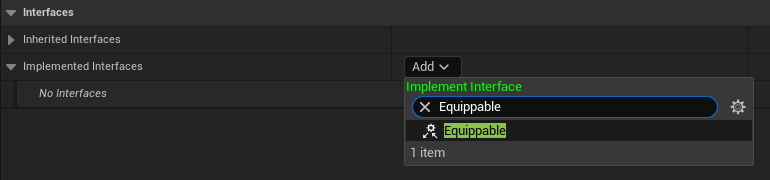
If we call GetEquipmentAsset directly like in Quick Recap, we will get an error: Do not directly call Event functions in Interfaces. Call Execute_GetEquipmentAsset instead. This is the case with all BlueprintNativeEvent and BlueprintImplementableEvent functions. They must always be called by using the static IEquippable::Execute_GetEquipmentAsset function.
We also have to make sure this static function is only ever called on objects that actually implement the interface. Attempting to call it on anything else results in another error. Here is how we can handle it correctly.
// Instead of Cast() we use Implements().
// Careful! This must be UEquippable, not IEquippable!
if (SomeObject && SomeObject->Implements<UEquippable>())
{
    // Only now is it safe to call Execute_GetEquipmentAsset.
    if (const UEquipmentAsset* EquipmentAsset = IEquippable::Execute_GetEquipmentAsset(SomeObject))
    {
        // SomeObject is equippable, execute equipment logic...
    }
}
This makes interface usage a bit boilerplate-heavy, especially if repeated across many places. And personally I always try to avoid redundant nesting and if clauses to keep functions easy to read. There is a very simple convention that addresses both of these issues.
# Future-Proofing UInterface
The idea is straightforward: we want to call GetEquipmentAsset, but the way we have to call it may change, right? Then how about wrapping those checks and the function call in a central place so we only ever have to change it once? The most cohesive place to do so is in a static function on the interface itself.
# Static Function Wrapper
For the sake of demonstration, we will go back to our C++-only interface from Quick Recap. We write a new static function that wraps the interface function call.
class IEquippable
{
    GENERATED_BODY()

public:
    // Our static function wrapper.
    static const UEquipmentAsset* GetEquipmentAsset(const UObject* Target);

    UFUNCTION(BlueprintCallable)
    const UEquipmentAsset* GetEquipmentAsset() const;
};
// Implementation of our static function wrapper.
const UEquipmentAsset* IEquippable::GetEquipmentAsset(const UObject* Target)
{
    // Instead of spreading Cast() calls throughout the codebase we cast just once here.
    const IEquippable* Equippable = Cast<IEquippable>(Target);
    // Then we return sensible defaults where possible.
    return Equippable ? Equippable->GetEquipmentAsset() : nullptr;
}
This works nicely for return types that have a sentinel value like nullptr. If you want to know how to best handle other return types, check out my post on Improving Program Flow In UE5 C++ & Blueprint.
Usage of IEquippable becomes much simpler and safer.
if (const UEquipmentAsset* EquipmentAsset = IEquippable::GetEquipmentAsset(SomeObject))
{
    // SomeObject is equippable, execute equipment logic...
}
# Easy Blueprint Compatibility
In addition to that, we get a very clear migration path to support Blueprint implementations of this interface.
class IEquippable
{
    GENERATED_BODY()

public:
    static const UEquipmentAsset* GetEquipmentAsset(const UObject* Target);

    // We add BlueprintNativeEvent.
    UFUNCTION(BlueprintNativeEvent, BlueprintCallable)
    const UEquipmentAsset* GetEquipmentAsset() const;
};
// We only have to adjust our static wrapper function.
const UEquipmentAsset* IEquippable::GetEquipmentAsset(const UObject* Target)
{
    // Instead of using Cast() we use Implements() and Unreal's generated Execute_GetEquipmentAsset function.
    return Target && Target->Implements<UEquippable>() ? Execute_GetEquipmentAsset(Target) : nullptr;
}
That is all; no other code changes are required anywhere for full Blueprint support! Neat! We gain some nice benefits on the C++ side at the cost of a static function call:
- ✔️ Single point of change for interface calling logic
- ✔️ Reduced boilerplate (
Cast<IEquippable>()&Implements<UEquippable>()) - ✔️ Safe
nullptrhandling - ✔️ Less nesting & cognitive load
But you may want to reconsider this pattern if you intend to call multiple functions from the same interface!
# Message Nodes
This convention is actually inspired by (Message) nodes in Blueprint. Message nodes become available when we declare a BlueprintCallable interface function.
Instead of calling the function on an object directly, Unreal Engine generates a node that simply does nothing if the object does not implement the interface.
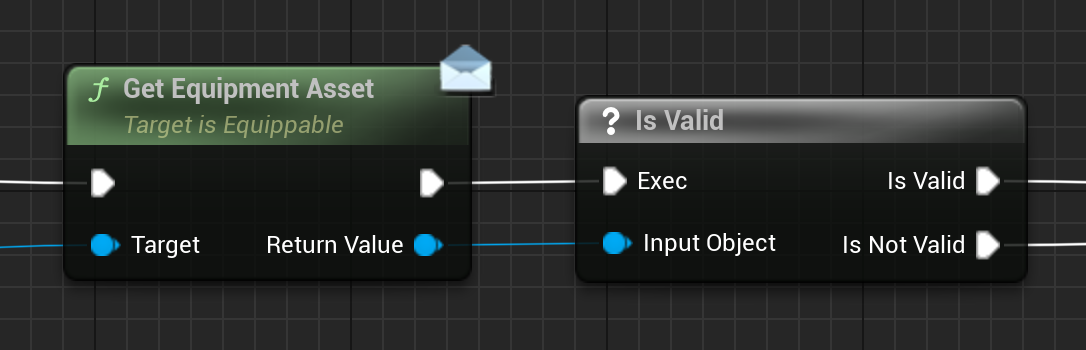
Message nodes can be accessed by right clicking in your Blueprint & searching for your interface or the function name, instead of dragging off of an object. Both patterns allow us to implicitly ask the question “Is this object equippable?” without an explicit check or cast.
# Final Thoughts
A short no-brainer this time, but even small improvements can have compounding effects on code readability, cognitive load, and especially our motivation to keep working on our projects.
Thanks for reading! You can check out planned & in-progress posts on the Kanban page and follow me on 𝕏 for updates.